Getting Sensitive Information From A To B
Securely With Cryptlib
After a decent number of weeks of intense coding and testing, I have finally finished my latest program clTLS (sig) which makes good use of Cryptlib's session interface.
Unlike a web browser or CLI programs like curl, which rely heavily on the global public key infrastructure, clTLS is designed to do only one thing, getting sensitive information from A to B in the most secure way available. In order to achieve this reliable data exchange, clTLS connects only to those web servers (via TLS) which can be authenticated using known-good information that is available to the end-user.
clTLS blocks all attempts to connect to web servers that cannot positively be established as a secure counterpart for the end-user, and in this regard it is much more restrictive and reliable than the widely-used browser everyone uses day-by-day.
How To Establish a Secure Connection via TLS
Essentially, there are two very different mechanisms that clTLS uses to ensure that the connection is actually established with the correct web server a user wants to connect to. But both mechanisms require trustworthy information that must be stored in the user's home directory before any TLS data exchange can happen.
Fingerprint Authentication
The first one (fingerprints) is used to make the reliance on a global PKI completely obsolete. Once the end-user is in possession of a fingerprint (SHA-256) of the certificate, a web server uses in the TLS-handshake, it can be stored in the user's home directory as a sign of trust. It does not matter, whether the server certificate has been acquired via a public CA or is a self-signed certificate, the existence of the stored fingerprint authenticates the web server as long as it produces the matching certificate when a connection is being initiated.
Of course the trustworthiness of the fingerprint does not emanate from thin air, but there are numerous ways, how the fingerprint can be checked for a given server, especially if the server is administered in an institution or organisation the user has got a relation to already.
It might be clear that this method of identity check for the server will be done only for a few selected servers, where the risk of exposing sensitive information to a different one would be fatal. And fingerprint verification is the most secure and easy way to prevent this. The stored fingerprint will reliably secure the TLS connection, as long as the fingerprint file has not been deleted, which is the only way to enable the second method of authentication, a selectively trusted Certification Authority.
Know Your Trusted CA
The global public key infrastructure has its inherent problems.First, the sheer number of CAs trusted by browsers poses the risk of a rogue actor issuing a fake certificate for a web server. Because generally, any CA can issue a certificate for any web server domain. In contrast, cltls is build to restrict the number of trusted CAs to a very limited set of CAs that are positively known to work securely. This set of trusted CAs is under the end-user's sole control as only the few (checked) CA certificates that are stored in the user's home directory will be used to verify a server certificate, not the plethora of CAs build into the operating system by default.
For any user only a few CAs are relevant, so the effort to check and provide known-good CA certificates for storage pays off, especially if the user gets those information first-hand from someone he can trust.
And secondly, if any organisation or institution wish to use their own (self-signed) web server certificate and want to restrict the TLS data transfer to members of their own organisation or institution, with clTLS it is quite easy to configure the trusted use of an internal web server. No PKI is required, once the organisation's certificate is present in the directory "$HOME/.cryptlib/certs/trusted".
How clTLS Works In Detail
Beyond that, what makes the use of Cryptlib for TLS connections particularly interesting is the implementation of TLS-LTS, the idea of a long-term-support for TLS. If you've never heard of TLS-LTS, it's best to read the original paper about TLS-LTS .
TLS-LTS is a minimal, highly-secure subset of TLS 1.2, which is built into Cryptlib since January 2018. Cryptlib signals the availability of TLS-LTS by sending a single byte (0x1A) during the initial TLS handshake (as part of its Client Hello) and tries to negotiate known-safe parameters for the cipher suite to be used. In addition to that, TLS-LTS improves the security of the master secret by applying hashes of every packet that is exchanged in the handshake process between client and server (extended master secret).
When Cryptlib connects to servers that don't reply to the TLS-LTS extension it at least mandates the extended master secret, Encrypt-then-MAC and other implementation requirements that ensure safe communication via TLS over long lifetimes between clients and servers.
A Case Study
Let's use clTLS to connect to "microsoft.com" and see what happens.
Hmm, the program exits with the return code 10 which means ERR_CORRUPT.
Now we can repeat that with an option "-debug" to get more information about the issue.With Cryptlib in debug mode it turned out that the server (150.171.109.210) accepts the cipher suite "TLS_ECDHE_RSA_WITH_AES_128_GCM_SHA256" but the certificate it presents, is not a valid TLS certificate chain.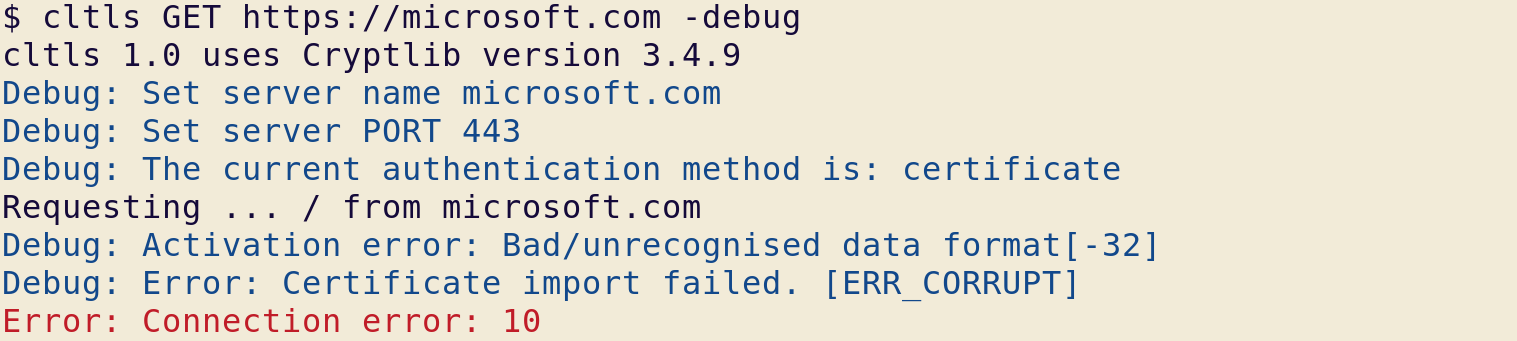
In a browser you'll never see the page for "microsoft.com" but are redirected to a different server "www.microsoft.com" which has its own certificate and a different IP address of course. To complicate matters even more "www.microsoft.com" is an alias for "www.microsoft.com-c-3.edgekey.net" and this is again an alias for "e13678.dscb.akamaiedge.net" with IP=23.39.42.97.
But at least using "www.microsoft.com" produces a TLS connection:
But the connection is still untrusted, because neither a fingerprint or a trusted top-level CA certificate is stored in the user's home directory. So, after storing the top-level certificate for "DigiCert Global Root G2" in a file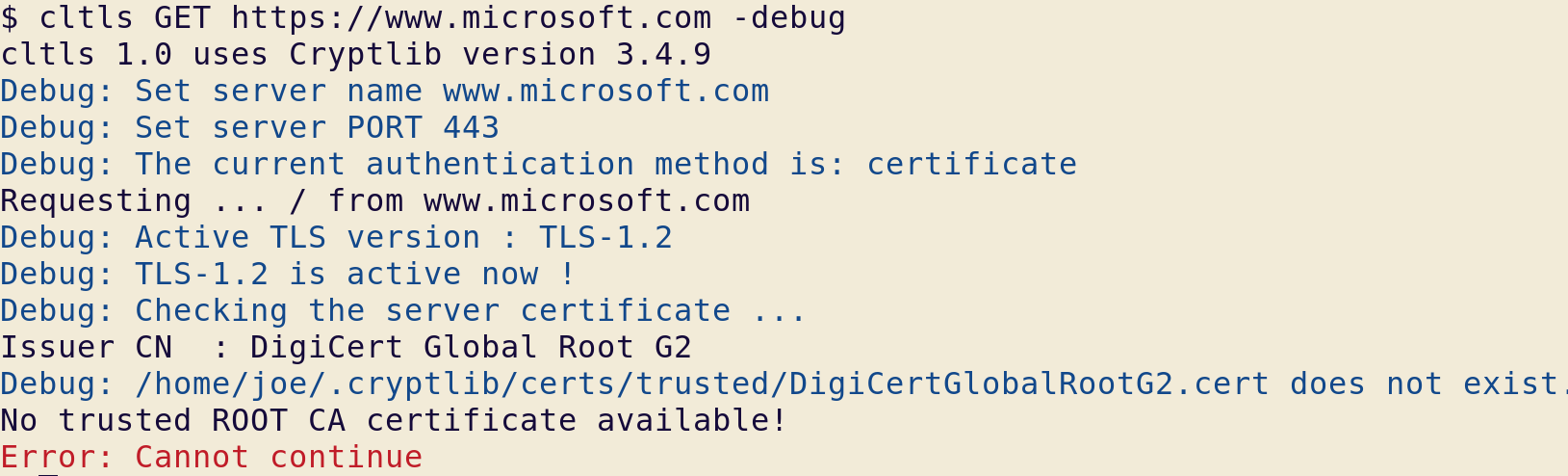
/home/joe/.cryptlib/certs/trusted/DigiCertGlobalRootG2.cert, the page is finally transferred and saved to the file system.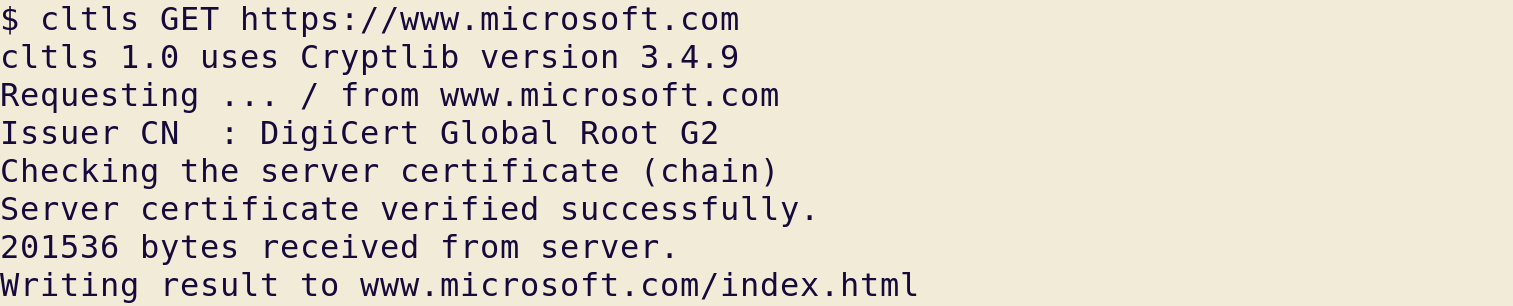
clTLS is build to safely navigate through such confusion.
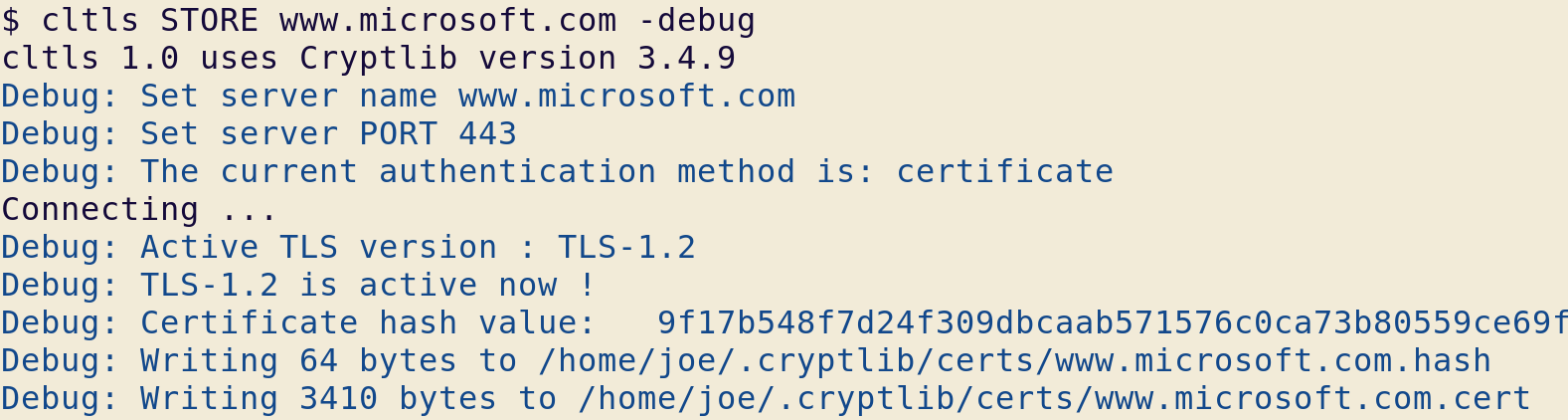
As you can see, only if the server name you actually want to use is successfully verified with a trusted CA certificate that is already present, the data transfer can continue. But you can also use the following to store a fingerprint. And needless to say, you must check the stored certificate thoroughly or delete both files altogether.
Handing Your Sensitive Data Over To The Server
Now, that you can control access to any server you wish to use, the PUT command allows you to send any type of information to that server using a TLS secured session. But as you will certainly be aware of, once your information arrives at the server it is further processed by whatever resource you decide to use as the target. clTLS secures your data transfer but not what is done to your data when it arrives at the server.
And that's another story altogether.
Using Cryptlib - Encryption Based On Solid Foundations
After a decent number of weeks of intense coding and testing, I have finally finished my latest program clAES (sig). This work is the result of my attempt to use Cryptlib as the foundation for file encryption (coded in Python3) which does one thing and only that, safely encrypt or decrypt a file with password-based AES.
And nothing more.
File encryption is long solved. Why clAES?
Talking about my project while still in progress, I had been confronted with the obvious question "why not simply use gpg" and the advice "use openssl directly, if you are brave". These objections to even start my now finished project are legitimate and demand a convincing reply.
Both GnuPG and OpenSSL basically rely on the use of two different shared libraries that provide the basic functions for encryption and decryption of data. As "libgcrypt" for gpg and "libcrypto" for OpenSSL both comprise of a vast amount of functions with great complexity, the correct use and safe handling of these functions fall into the hands of the C-programmer, who often does not have the cryptographic expertise nor the experience needed to safely apply the library functions to their own code without the risk of coding something that ends in disaster. It is very likely that shooting oneself in the foot unintentionally will be the result of trying to add security to a project.
More often than not, the prospect to ruin the objective of safeguarding his own code by using cryptography may put him off using cryptography at all. As a result, the code is unsafe to use and could be much more reliable and privacy-protecting if there was a way to use encryption without the risk of doing something nasty unintentionally.
Cryptlib - The Well-designed Security Architecture
Obviously the last thing that is needed is another collection of crypto-functions. And Cryptlib, which is developed and maintained by Peter Gutmann, is so much more than just another library of functions. Cryptlib is designed to be integrated into any program that needs security features in a way that it makes unsafe use of cryptography almost impossible.
More than 20 years ago, Peter Gutmann described a security architecture in his PhD thesis at the University of Auckland, which had become the foundation for Cryptlib as it is available in different programming languages (including Python) today.
It is quite difficult to describe Cryptlib in a few sentences. But what sets it apart from a collection of functions is its design. In layman's words, the core of the software is a security kernel which is completely isolated from the code that initiates the desired cryptographic actions. The security kernel communicates with the code that uses the library in a way that sensitive information does never leave the kernel until the task is completed and only safe access to processes in the security kernel will be allowed from the outside. The objects inside the security kernel interact with one another based on principles that can be verified to ensure safe operation. Secure defaults are used at all times without the need to produce certain parameters by the programmer who uses Cryptlib. All internal methods are safeguarded by strict parameter checking so that no malformed input can jeopardize the functionality and secure operation inside the architecture.
Such a well-designed system also provides methods of access to its functionality that can be used by inexperienced programmers. This ensures that every project in need of reliable cryptography can be extended by the use of Cryptlib.
With this extraordinary foundation at hand, I started to code a message encryption program that works reliably and is able to interact with GnuPG and OpenSSL. If you use only one of them, the resulting encrypted cipher texts are stored in a format that cannot be interchanged with the other. GnuPG aims to implement the OpenPGP standard with various degrees of success in a format that consists of packets described in RFC-4880, while OpenSSL (accessed via the command line tools) can produce cipher text in CMS-format or in its own format. As it is seen so often, both worlds (although using AES) cannot talk to each other easily.
But clAES is made to talk to both, as it can produce OpenPGP messages (as the default) and additionally switch to CMS or OpenSSL message formats if need be. In any case the input data is encrypted with a passphrase that the user provides to the program and AES will be used as the default encryption method.
Facing Unexpected Obstacles
Although it is possible to use Cryptlib safely with very few lines of Python code, actually I encountered a number of hurdles standing in the way while finishing my program. Most of them I didn't expect.
The lessons I learned while coding clAES seem to me worth describing, so I hope my experience with Cryptlib-coding in Python may pave the way for those of you who have developed an appetite for using Cryptlib in your project by now.
Starting with a test program of only a few dozen lines I ended up with a finished clAES of some 1083 lines of Python code. Some of it of course were necessary to handle options selecting between the default OpenPGP message format and the other modes of operation. And a great part of the code base was due to handle safe input and output of text being read from the file system or standard input.
Then the input, which is always expected as ascii-armoured (or base64 encoded) data has a different structure in GnuPG and in OpenSSL. These structures had to be parsed and separated into blocks containing the naked plain texts or cipher texts.
Before I could start to encrypt or decrypt the data blocks, I had to code a checksum function for GnuPG messages (crc24) and a function to derive an AES sessionkey from the user's passphrase for OpenSSL (pbkdf2).
Finally, the rest of the program, some 400 lines, would deal with using Cryptlib (from line 624 to the end) for conventional encryption.
The definitive source of documentation
Before I draw you into the details of my program, I have to mention the excellent documentation of Cryptlib. In the 358 pages of this manual you will find explanations of everything that can be achieved with Cryptlib which goes way beyond mere conventional encryption. You don't have to digest everything in the manual before you can start using Cryptlib, but you'll find it a valuable source of information (including code examples) to come back to from time to time.By the way, there is a unix-style man page for clAES as well.
Starting to use Cryptlib Envelopes (High-Level)
Let's start with some peculiarities that are specific to the Python language.Everything that relates to OpenPGP messages can be done with envelopes. Envelopes are the Cryptlib objects that do not only initiate encryption but also produce output in the OpenPGP message format. The first step is to create an envelope of type CRYPT_FORMAT_PGP.
Envelope_object = cryptCreateEnvelope( cryptUser, CRYPT_FORMAT_PGP )
Envelope = int( Envelope_object )
One would expect that the first line would suffice. But in every function that subsequently uses this envelope object an integer value is expected as the first parameter of many functions (a handle to the envelope). So casting the object into an integer for further use (including destruction of the envelope object) is necessary in the Python language.
Try-Except needs to be used instead of status codes
The following lines will add a user-provided passphrase to the PGP-envelope by setting a string attribute of the envelope named CRYPT_ENVINFO_PASSWORD. Coding in the C language you would store the return code of the cryptlib function "cryptSetAttributeString" and check if the operation has succeeded by checking for (status == 0) or (status == CRYPT_OK). The program would proceed once the status is 0.In Python most functions don't return a status code, so it is essential that you check the success of each cryptlib function with a try-except block in which you can extract the status (as an integer) as well as a message (as a real string) for debugging purposes. Let me stress this important point: before exiting the program as a consequence of an unrecoverable error, you need to clean up the memory. Don't just exit the code without taking care that sensible information in memory is being randomized reliably.
try:
# add the encryption password to the envelope
cryptSetAttributeString( Envelope, CRYPT_ENVINFO_PASSWORD, password )
except CryptException as e :
status, message = e.args
if (status == CRYPT_ERROR_WRONGKEY) :
print("Error: " + message)
clean_envelope()
exit( ERR_WRONGKEY )
Strings are always bytearrays
Some attributes of envelopes are numbers for instance the maximum buffer size CRYPT_ATTRIBUTE_BUFFERSIZE. Other attributes like passwords are strings. Only that strings are not actually strings, because a string in Python has an encoding method, but in Cryptlib all strings must be interpreted as literal bytes. So wherever a string is needed, you have to use a bytearray() instead. Bytearrays can be extended with actual strings or they can be appended by adding a byte at a time. The len() function also works similar to strings as does the indexing.
Text input to the envelope has to be a bytearray() too, of course.
When the passphrase is added to the envelope and CRYPT_ENVINFO_DATASIZE is set to the length of the input data (which is only necessary with PGP-envelopes), the actual encryption is done by:
bytesCopied = cryptPushData( Envelope, Data )
cryptFlushData( Envelope )
bytesCopied = cryptPopData( Envelope, envelopedData, DataBufferSize )
Buffer = envelopedData[:bytesCopied]
# Buffer holds the encrypted data
I have deliberately omitted the try-except blocks and every safeguard I talked about above to highlight the essential function calls. The bytearray "Buffer" can be written to the file system as a byte stream after being base64 encoded and being decorated with the usual "-----Begin ..." lines. (And uhh, adding the CRC24 checksum, I forgot to mention)
s2k-Overkill
When OpenPGP messages are to be decrypted inside a PGP-envelope the encryption algorithm that had been used must be detected by Cryptlib. In addition to that, it has to be determined how often the envelope has to hash the passphrase internally (using the s2k function) to derive an AES session key from the user provided passphrase.In fact, messages that are produced by gpg2 demand a hilariously large number of hash iterations, so that Cryptlib has to put an end to this nonsense by allowing only some eight million iterations. This can cause the decryption of some gpg messages to fail, because enough is enough and from a security point of view it is not prudent to force the maximum allowed number of iterations on every software that attempts to decrypt gpg messages. Maybe in future Cryptlib will accept hilariously large s2k counts but at the moment there is a generous limit, that should not be exceeded by gpg2.
Using Crypt-Contexts (Low-Level)
I found that switching to OpenSSL messages, envelopes are not enough. I had to do something which, although it is possible, under normal circumstances has to be avoided as much as possible. I'm talking about resorting to low-level use of Cryptlib. To manipulate the decryption process at a low level, Cryptlib provides crypt-contexts that can be used as an alternative to envelopes.Obviously, crypt-contexts are more error-prone than envelopes, because the programmer has to use them in the cryptographically correct way, which is not easy as my code will show you.
crypt_object = cryptCreateContext( cryptUser , CRYPT_ALGO_AES )
AESContext = int ( crypt_object )Insted of an envelope you will now create a context that is prepared for applying the AES cipher to its input. Similar to envelopes, the AEScontext has a number of attributes that have to be set correctly in order to ensure proper encryption.
First of all, the session key (128 bits or 256 bits) as well as the initialisation vector (128 bits) need to be derived from the passphrase in advance. I had to code the function pbkdf2 for this task. But this function expects a salt value of 8 bytes that is really random and does not repeat. This in itself is a very complex issue, so I decided to use the method of getting real random numbers that Peter Gutmann describes in his manual on page 287.
Once everything is set and done, all necessary attributes can be set inside the AEScontext.
cryptSetAttribute( AESContext, CRYPT_CTXINFO_MODE, CRYPT_MODE_CBC )
cryptSetAttribute( AESContext, CRYPT_CTXINFO_KEYSIZE, AESblocksize )
cryptSetAttributeString( AESContext, CRYPT_CTXINFO_KEY, sessionkey )
cryptSetAttributeString( AESContext, CRYPT_CTXINFO_IV, iv )
# encrypt Data in the context
try:
status = cryptEncrypt( AESContext, Data )
except CryptException as e :
status, message = e.args
print_debug( "Encryption error while encrypting data ...")
...If the cryptEncrypt function is successful, the cipher text can be taken from the bytearray() "Data" that originally provided the clear text, because crypt-contexts always change data "in-place". No pop-function is necessary in crypt-contexts to extract the cipher text (or the plain text) as it would be used with envelopes.
The need for padding the clear text
But if you think that is it, you're wrong. Because the AES cipher is designed to work on 128 bit blocks of data (16 bytes at once) the input data, a bytearray, must have a specific length. The input needs to be a multiple of the block size, otherwise AES cannot work.To achieve this, all input has to be extended at the end to the exact number of bytes that are needed. Even input that already has a length of a multiple of the blocksize needs to be padded. There is a method that openssl uses to pad all messages (PKCS#7 padding) that appends a certain number of bytes to every input so that it reaches the desired length. For instance, if the input lacks seven bytes to be a multiple of 16 bytes, then the padding adds seven bytes of the value seven to the end. If it is nine, then nine bytes of value nine are added and if the length is already ok, sixteen bytes of value sixteen are added.
With this clever method every decrypted message can be chopped to its original length by reading the last byte of the decrypted message and chopping as many bytes off the plain text as the value in the last byte demands. This guarantees that the padding is removed reliably from the decrypted data after decryption.
Randomize all sensitive data before exiting
Errors, even unrecoverable errors can happen. Just think of the fact, that the provided passphrase is empty or does not produce the AES session key which had been used to encrypt the message. My code base for clAES shows 35 points where the program cannot continue and has to be aborted. In all these cases it would be irresponsible to just throw an exit() and be done. Sensible data like the password bytearray or clear text buffers are still present in memory. So the least you can do is to clear the buffers by filling them with random data.This is the task of the function "clean_envelope()" and "clean_context()" in addition to destroying the envelope or crypt-context.
Get Your Hands on Cryptlib
I hope you could gain some benefit out of my explanations. Most difficulties, I ran into, are owed to the fact that I tried to connect to two very different worlds of practical file encryption, GnuPG and OpenSSL. But for every project that uses cryptography it is essential to determine, who will get the final results of this project. And that involves hard thinking about the formats in which encrypted data is presented to ordinary users. No amount of scrutiny and invention is wasted on this issue.So let me finally tell you how you can get and use Cryptlib.
The direct way is visiting Peter Gutmann's Cryptlib download page. Here you'll find the original zipped archive of all files Peter releases from time to time. Once you have unzipped the archive, you are only a "make shared" away from building the shared library on your own OS yourself.
Another path is to use my Cryptlib Hub to download a recent version of the library together with bindings for Python, Perl and Java in a single RPM package or DEB package, that can be installed on many OS, that handle these software bundles. (Fedora, Centos, Ubuntu, etc.)
These packages will eventually contain all cryptlib-tools that I develop, including clAES of course.
If you happen to use the Fedora OS, everything mentioned above is available from the main repository.
As a last remark, if you have experience with using Cryptlib now or in future, I'd really like to hear from you.
Trying To Solve The Hen-And-Egg Problem
We're living in an online world that is severely harmed by universal surveillance.
Our every-day lives in this world depend on complex and pretty obscure services run by companies, that leave the ordinary internet user with little alternative to giving up their privacy.
In doing so, they also have substantially reduced our freedom, the freedom to share thoughts with other people confidentially.
It's time to take back this freedom and to have secure communications without the fear of surreptitious intrusions into our privacy. Secure communication is a right, not a generous concession. And it will only work, if you're going to take control over what happens yourself.
Why is it so hard to find a useful solution?
Ordinary users are no encryption experts, and they don't want to become an expert. Secure communication should be a matter of course for everyone.
On the other hand, there is no simple solution for secure communications ready to go. And the reason is simple: a solution is useful only, if it is secure, if it can defend against the numerous threats lurking around in the online world. To design such a secure solution is hard, because the threats are complex and constantly changing.
This fact makes people believe that they have to trust the internet giants to deliver and run secure communication for them, which they don't control nor understand or worse, that they have to send their messages unprotected. And many decide to do exactly this.
A well-designed encryption tool under your control
The Crypto Bone is here to change that.
People who have tried to use encryption often find themselves in the desperate situation of managing all the different and confusing encryption keys. Key management is a really hard job and should also better be done by a separate device, especially designed for that task.
We all know that computers we use today are complex things and can be attacked in may ways.
So it is prudent to delegate all the hard work of message encryption to a separate device - the Crypto Bone - that is prepared to work reliably as an isolated, well-designed tool with minimal complexity.
It is much easier to ensure that such a device encrypts your messages securely than your complex computer.
These were the two main reasons for me to develop the Crypto Bone.
In short, the Crypto Bone will make your life easier, because it offers you a choice, you didn't have before: to escape the universal surveillance in a way that you control yourself.
Encryption has to be both: Secure and Usable
This new approach to key management is what makes the Crypto Bone really easy-to-use. For any contact you wish to share messages in private, you'll need to provide an initial secret to the Crypto Bone only once.
After that the messages are automatically encrypted and sent to your correspondent. You won't have to bother about message keys from now on and you can send your messages safely through the Crypto Bone, which takes care of all the complex tasks, you won't spend a second thought about.
But how would you be sure that the Crypto Bone is really secure in its operation?
Well, the only answer is peer-review. The Crypto Bone has been designed to be as auditable as possible, it uses the OpenBSD operating system and one single high-quality crypto library (CryptLib, maintained by Peter Gutmann) as the core crypto engine. And I have invited security experts from day one of the development to scrutinize the source code.
The Hen-And-Egg Problem
But as far as I know, this peer-review has not happened, yet.
And despite the fact that I have taken any possible precaution to make sure the code does not have any security problems, I cannot say the Crypto Bone is secure to use.
But on the other hand, without a relevant user base, the incentive to take the time and effort for a thorough code review is virtually non-existent.
This is a special version of the hen-and-egg problem, that has to be solved one way or the other.
The Crypto Bone ALL-IN-ONE
Well, not everyone has a Beagle Bone.
And, if you're using the Crypto Bone, your encrypted messages will reach other people who might not have a Beagle Bone. And that's why very few people will use this kind of secure communication, yet.
On the other hand, checking the software - and even the core software - for security pays off, only if many users rely on this software day-by-day. Only if the Crypto Bone's user base has become large enough, security experts will take the time to poke inside the software for bugs and security problems.
I try to approach this dilemma by making it easy for everyone to run a Crypto Bone, even if you don't possess the extra hardware. I have developed a software-only version of the Crypto Bone that can be installed on every Linux computer, as RPM and DEB packages are readily available.
After installation of the RPM or DEB package, anyone will be able to use a Crypto Bone within seconds. Think of it as a virtual Crypto Bone, made available on your Linux computer instead of using an external, separate hardware.
Of course, the question has to be answered, if the software-based Crypto Bone is secure to use. Would the software-based version not destroy the main benefit of a separate encryption device, its isolation and independence from all the numerous attacks on your main computer?
Attacks on the Crypto Bone
In a way, yes that's true, a separate system is always better protected than the virtual Crypto Bone.
There are a number of possible attacks on the Crypto Bone most of which can be defeated with the current design of the Crypto Bone. If the protected message key database is now stored on your computer instead of the separate device, the virtual Crypto Bone has to make sure, that someone who wants to attack these secrets, would need root permission to do this. Of course, its much more likely that an attacker will succeed to gain root permission on your local computer, because of the sheer number of additional software installed, but if someone has got root permission, well, essentialy the game is over already.
In this sense, using the ALL-IN-ONE virtual Crypto Bone is pretty safe if you guard your root account and you can switch to using a real Crypto Bone while you are using your GUI program that controls your virtual or real Crypto Bone.
So why not check out the ALL-IN-ONE Crypto Bone, and tell me what you think.
The Crypto Pi
This year has had some devastating news about the state of the internet infrastructure in store and came with some disillusion about the vulnerability of tools we use day by day. And BTW it had turned out, that Johnny still can't encrypt.
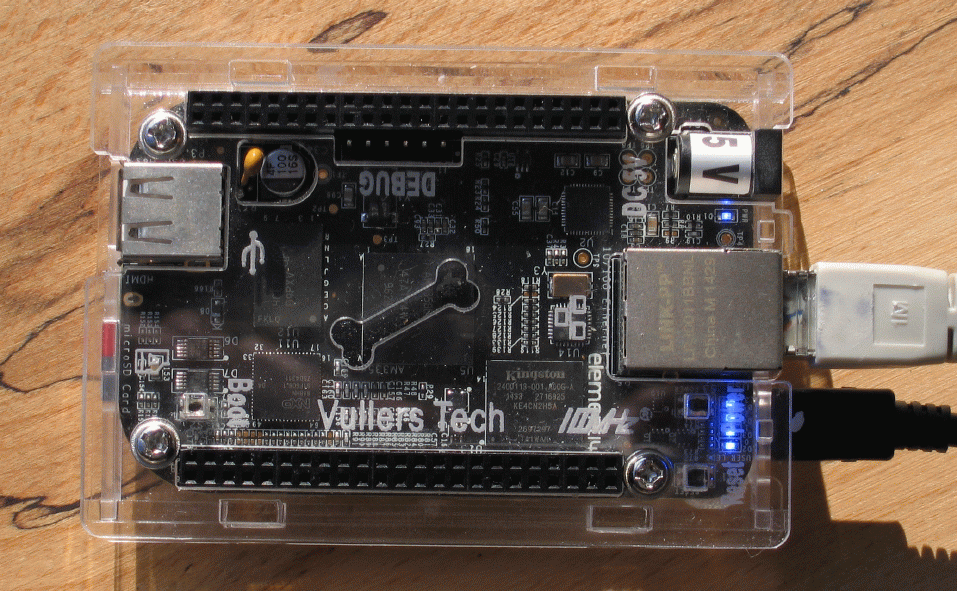
To change that, I've put some effort into developing the crypto pi.
While running on a minimalist Linux OS with only the necessary tools installed, the crypto pi is different both from internet servers and insecure endpoints, and helps Johnny to establish secure communication that is always encrypted, without burdening him with complex tasks that would only make him avoid using secure communication.
The crypto pi is in its early stages of its infant life and although it's working and looking great, it has not got the most important ingredient for a happy life (yet), peer-review.
So I'd like to ask all of you, who think a well-designed, isolated crypto box under the sole control of its user, capable of doing message encryption reliably, may improve the situation we're facing today, to give a hand and scrutinize the design and implementation of the crypto pi. Let's make the crypto pi a success in 2015, together.
The concept of secure communication using the crypto pi relies on several assumptions, not everyone will agree to:
- Johnny will be able to communicate securely with people he knows, if he had been able to exchange an initial secret information (on a piece of paper, via telephone, or some other way)
- Johnny's endpoint device is not trustworthy, as it runs all kinds of complex programs that are prone to attack the secrets on his device without notice in unforeseeable ways.
- Apart from feeding the crypto pi with the initial secret and an email address of the recipient (by filling out a form) Johnny has nothing to do with key management, but will be able to verify that message encryption has been performed.
- All secrets are stored on the crypto pi and messages leave the crypto pi AES-encrypted with a strong randomly generated key. The crypto pi does not use public key cryptography, there is no PKI nor CAs involved.
- Johnny uses one single secret that he alone knows to establish an encrypted tunnel to the crypto pi over which he interacts with the web server on the crypto pi to read and write messages.
- The local network in which the crypto pi works is not trustworthy, so all information that originates from the crypto pi is encrypted and only encrypted information that enters the crypto pi will be processed inside.
- Although desirable, ensuring anonymity is not a pre-requisite of the crypto pi's design (at the moment).
- All source code is licensed under GPL.
Fortunately, the crypto pi has a home (crypto-pi.com) where you can get more detailed information about its fundamental concepts and implementation. Make sure, your criticism and constructive suggestions will be used to improve this project.
Best wishes for 2015
Ralf Senderek